The Four-Lane Architecture Behind My Personal AI Brain
In part one, I explained the problem: too many open loops, too much fragmentation, and a discipline problem that turned out to be a system problem.
This post is about the design.
The first question I had to answer was simple: how should information actually flow through this system? Where does it enter, where does it go, and what does "done" look like for each piece?
That question is worth spending time on. Getting it wrong early means fixing it everywhere later.
Start With the Simplest Thing That Can Work
My constraint from the beginning was simplicity.
Not simplicity as a compromise — simplicity as an intentional choice. One person. A few dozen captures per day. No team, no SLA, no scale requirements.
The question I kept asking was: what is the minimum number of moving parts that cover every step? Not what is possible, but what is necessary.
So I defined the data flow first, picked one tool per responsibility, and made sure each layer could be replaced without touching the others. That discipline is what kept the design clean.
The Four-Lane Model
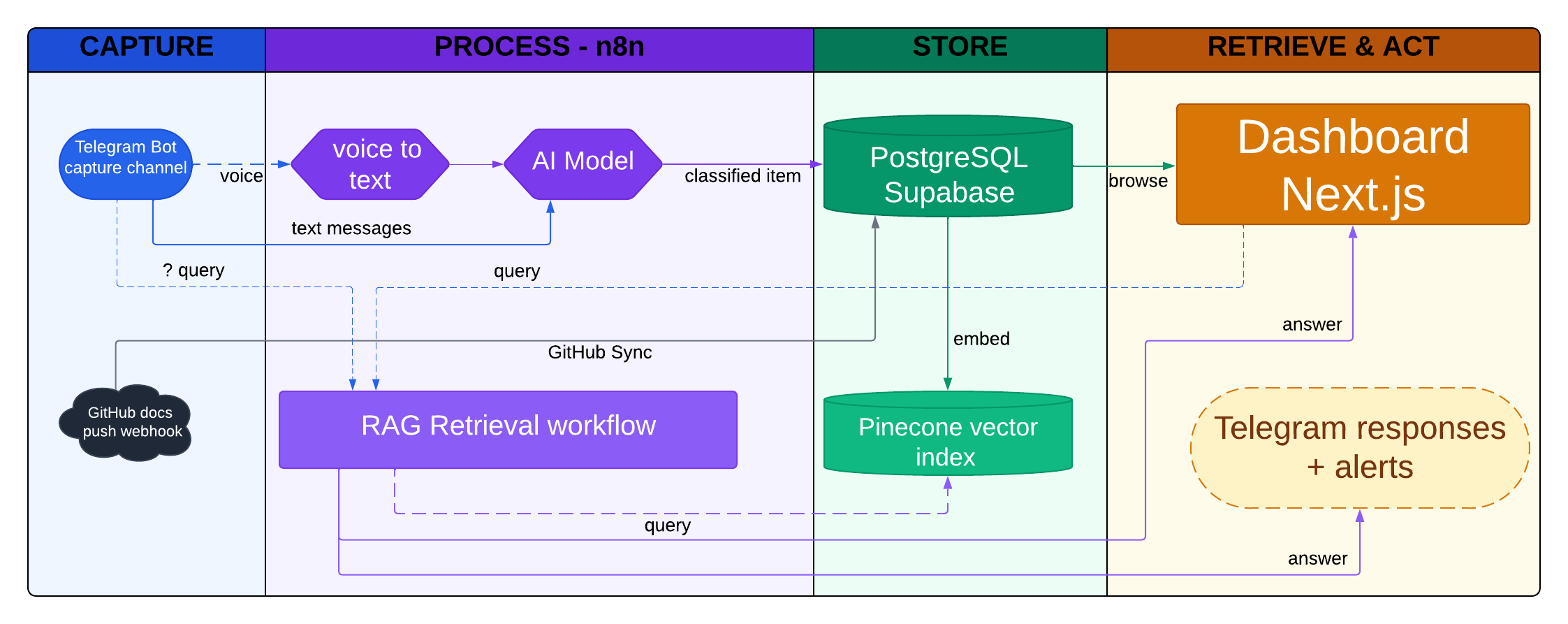
I drew the architecture as a swimlane diagram with four lanes. That framing turned out to be exactly right.
CAPTURE → PROCESS → STORE → RETRIEVE & ACT
Every piece of information enters from the left and exits on the right. Nothing jumps a lane. Nothing skips a step. The system only does useful work when items flow cleanly from capture to retrieval.
PARA (Projects, Areas, Resources, Archive): How I Discovered It
Before going lane by lane, one concept needs to be clear because it appears throughout the architecture.
When I started designing the system, I had the four lanes but I did not have a clear way to organize what goes inside them. How do you decide where a note belongs? Is it relevant now or just someday? Is it something I am actively working on or just reference material?
I came across the PARA method while searching for answers to exactly that question. It was created by Tiago Forte and stands for Projects, Areas, Resources, and Archive.
The idea is simple: every piece of information belongs to one of four buckets, determined by how actionable it is right now.
- Project — has a finish line, something you are actively working toward
- Area — an ongoing responsibility with no end date (health, finances, career)
- Resource — useful someday, saved for reference but not acted on now
- Archive — no longer active, kept for context
What clicked for me was the question it forces you to ask: what does this mean for my life right now? That single question replaces a thousand decisions about where to file things.
I built PARA directly into the classification step, not as a UI layer on top.
When GPT-4o-mini processes an incoming item, it does not just return a label. It reasons about the item and assigns it to exactly one of the four buckets as part of the same call that classifies the item type. That bucket assignment travels with the item through storage, indexing, and display.
The dashboard just reads what is already there.
This matters because PARA stays consistent across every surface. Telegram confirms the bucket. The dashboard filters by it. Queries retrieve by it. There is no place where the system shows items without their bucket context.
Lane 1: Capture
This is where the system meets real life.
Two capture paths:
-
Telegram Bot — the primary input. I message my own bot for anything: a voice note while walking, a quick text idea, a task I just remembered. The key design principle here is zero friction. If capture requires switching apps, opening a dedicated tool, or formatting anything, it will not happen consistently.
-
GitHub webhook — the secondary input. I write technical notes and documentation in a private GitHub repo. When I push, a webhook fires, and the system pulls the changed files and syncs them to the same database as everything else.
Both inputs land in the same pipeline. The system does not care where something came from. It only cares what it is.
Lane 2: Process — n8n
This is where raw input becomes structured data.
n8n runs two distinct workflows in this lane:
Brain Ingestion handles anything that comes in through Telegram. If the message is a voice recording, it first goes through Whisper STT to produce a transcript. If it is text, it skips that step. Either way, the text then goes to GPT-4o-mini, which does two things: classifies the item type (task, idea, note, link, reminder) and assigns a PARA bucket (Project, Area, Resource, or Archive). The result is a structured JSON record sent to PostgreSQL.
Ask Brain handles the retrieval path. When I send a message starting with ?, the Telegram Bot triggers this webhook instead of the ingestion workflow. n8n takes the query, runs a semantic search against Pinecone, pulls the top matching items, and sends the full context to GPT-4o for a grounded answer. The answer comes back to me in Telegram.
Keeping these as two separate n8n workflows was a deliberate choice. Ingestion and retrieval have completely different failure modes, different latency requirements, and different data dependencies. Mixing them would have made debugging much harder.
Lane 3: Store
Two databases. One for structure, one for meaning.
PostgreSQL on Supabase is the system of record. Every captured item lives here as a row with metadata: type, PARA bucket, content, source, timestamps, and status. The dashboard reads and writes exclusively against this database. SQL queries handle filtering, sorting, and task management.
Pinecone is the vector index. After an item is stored in PostgreSQL, an embedding is computed from its content using OpenAI's embedding model and written to Pinecone. This enables semantic retrieval: finding items by meaning, not by keyword match.
Why both? Because they solve different problems.
PostgreSQL helps with clear list-style questions, such as:
- "Show me what I still need to do this week."
- "Show me everything in my Projects bucket."
- "How many unfinished tasks do I have right now?"
Pinecone helps with memory-style questions, such as:
- "What did I write before about improving my routine?"
- "Did I already save something related to this idea?"
- "Bring me notes that are about the same topic, even if I used different words."
Using one for the other would make both worse.
Lane 4: Retrieve & Act
Two surfaces where the stored information comes back to me.
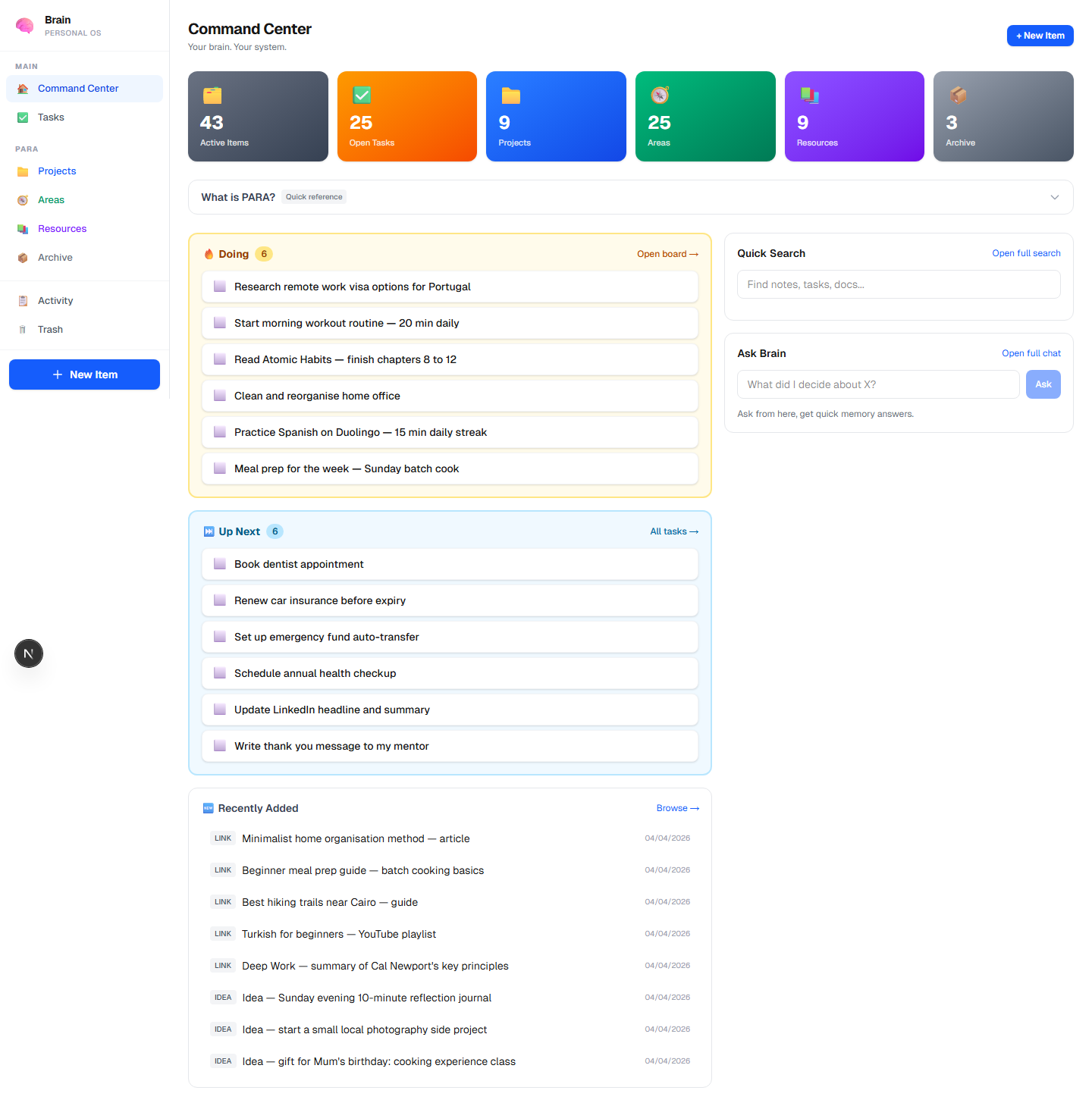
The dashboard (Next.js, deployed on Vercel) is the primary review surface. It shows all items organized by PARA bucket, a Kanban task board, quick search, an Ask Brain chat interface, and a digest timeline. I use it for weekly reviews and when I want to browse rather than query.
Telegram responses are the asynchronous surface. After ingestion, the bot confirms what was saved with a short message: "Saved: Project — [item title]". After a ? query, it returns the answer inline. This means I never have to open the dashboard to capture or ask something. The whole loop can happen inside Telegram.
Next
The architecture gave me the skeleton. The tools gave it life.
In the next posts, I will share how the system works in practice and the tools behind it.